Protect a Sheet in Excel

When you share an Excel file with other users you may want to protect a worksheet to help prevent it from being changed.
1. Right click a worksheet tab.
2. Click Protect Sheet.
3. Enter a password.
4. Check the actions you allow the users of your worksheet to perform.
5. Click OK.

Note: if you don't check any action users can only view the Excel file!
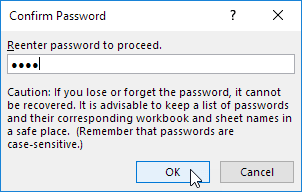
6. Confirm the password and click OK.
Your worksheet is protected now. To unprotect a worksheet right click on the worksheet tab and click Unprotect Sheet. The password for the downloadable Excel file is "easy".
Written by
Jason Howie
Founder, FormulasHQ
A formula nerd with a passion for numbers and equations. Writes about Excel, Google Sheets, VBA, regex, and Salesforce formulas — for people who spend their day in spreadsheets.