Count and Sum Functions in Excel

The most used functions in Excel are the functions that count and sum. You can count and sum based on one criteria or multiple criteria.
COUNT
To count the number of cells that contain numbers use the COUNT function.
Note: to count blank and nonblank cells in Excel use COUNTBLANK and COUNTA.
COUNTIFTo count cells based on one criteria (for example greater than 9) use the following COUNTIF function.

Note: visit our page about the COUNTIF function for many more examples.
COUNTIFSTo count rows based on multiple criteria (for example green and greater than 9) use the following COUNTIFS function.

To sum a range of cells use the SUM function.

Note: visit our page about the SUM function for many more examples.
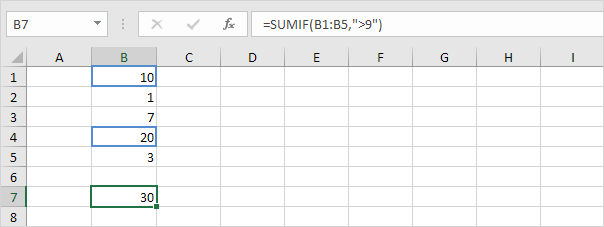
SUMIFTo sum cells based on one criteria (for example greater than 9) use the following SUMIF function (two arguments).
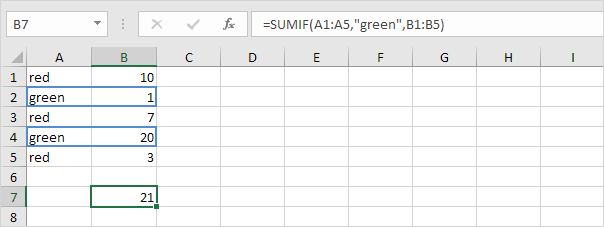
To sum cells based on one criteria (for example green) use the following SUMIF function (three arguments last argument is the range to sum).
Note: visit our page about the SUMIF function for many more examples.
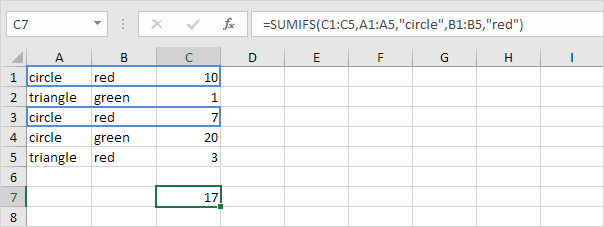
SUMIFSTo sum cells based on multiple criteria (for example circle and red) use the following SUMIFS function (first argument is the range to sum).
General note: in a similar way you can use the AVERAGEIF function to average cells based on one criteria and the AVERAGEIFS function to average cells based on multiple criteria.
Written by
Jason Howie
Founder, FormulasHQ
A formula nerd with a passion for numbers and equations. Writes about Excel, Google Sheets, VBA, regex, and Salesforce formulas — for people who spend their day in spreadsheets.