Count Cells with Text in Excel - Easy Formulas

This page illustrates multiple ways to count cells with text in Excel. Visit our page about the COUNTIF function to count cells that contain specific text.
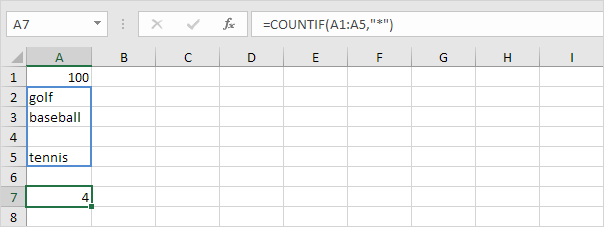
1a. Use the COUNTIF function and the asterisk symbol (*) to count cells with text.
1b. You can also create an array formula to count cells with text.
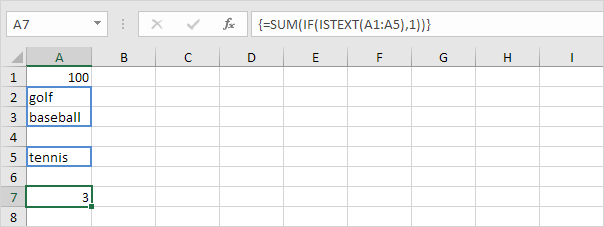
Note: visit our page about array formulas to learn more about single cell array formulas.
1c. You can also use the SUMPRODUCT function to count cells with text.
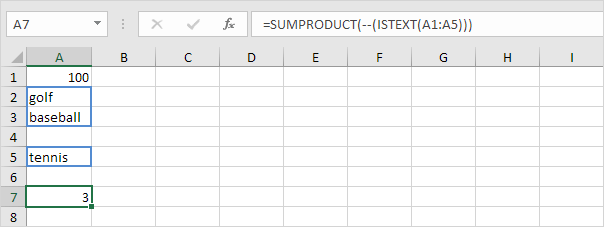
Note: visit our page about the SUMPRODUCT function to learn more about this function.
2a. Numbers Booleans (TRUE or FALSE) blanks and errors are not counted as text.
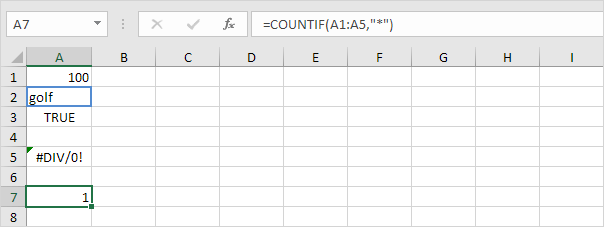
2b. The formula below counts cells with text and counts cells with Booleans.
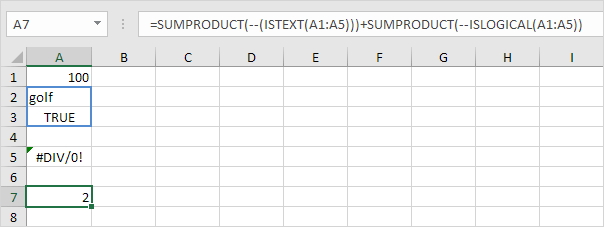
3a. Enter a space into cell A4. The COUNTIF function at step 1a and step 2a also counts cells with a space character.
3b. The COUNTIFS function below counts cells with text and excludes cells with a space character.
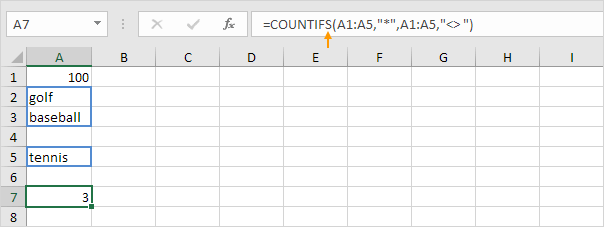
Note: the COUNTIFS function in Excel counts cells based on two or more criteria.
Written by
Jason Howie
Founder, FormulasHQ
A formula nerd with a passion for numbers and equations. Writes about Excel, Google Sheets, VBA, regex, and Salesforce formulas — for people who spend their day in spreadsheets.