How to use ExcelOctober 11, 2024
Sort by Color in Excel

This example teaches you how to sort data by color in Excel.
1. Click any single cell inside a data set.
2. On the Data tab in the Sort & Filter group click Sort.

The Sort dialog box appears.
3. Sort by Last Name (or any other column) sort on Cell Color (you can also sort on Font Color and Cell Icon) and select the green color for the first level.
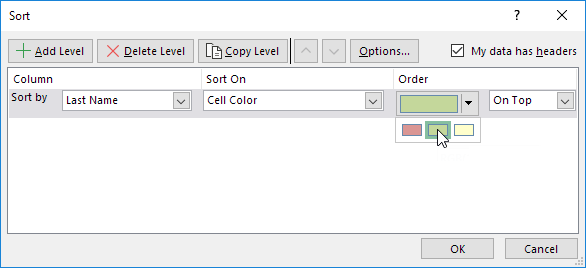
4. Click 'Copy Level' two times and select the other colors.
5. Click OK.

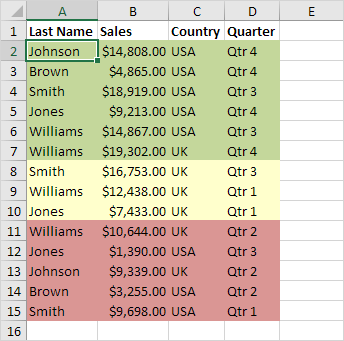
Result:
Written by
Jason Howie
Founder, FormulasHQ
A formula nerd with a passion for numbers and equations. Writes about Excel, Google Sheets, VBA, regex, and Salesforce formulas — for people who spend their day in spreadsheets.