How to Sort Data in Excel

You can sort your Excel data by one column or multiple columns. You can sort in ascending or descending order.
Sort by One Column
To sort by one column in Excel execute the following steps.
1. Click any cell in the column you want to sort.
2. To sort in ascending order on the Data tab in the Sort & Filter group click AZ.
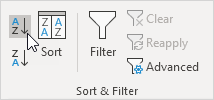
Result:

Note: to sort in descending order click ZA.
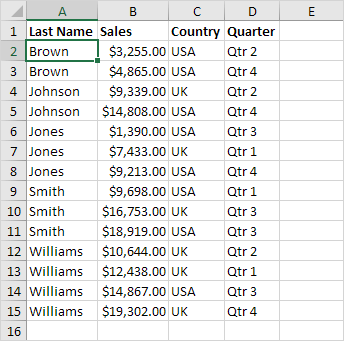
Sort by Multiple ColumnsTo sort by multiple columns in Excel execute the following steps.
1. On the Data tab in the Sort & Filter group click Sort.
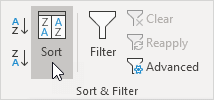
The Sort dialog box appears.
2. Select Last Name from the 'Sort by' drop-down list.
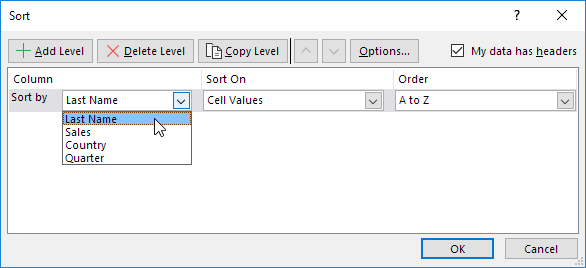
3. Click on Add Level.
4. Select Sales from the 'Then by' drop-down list.
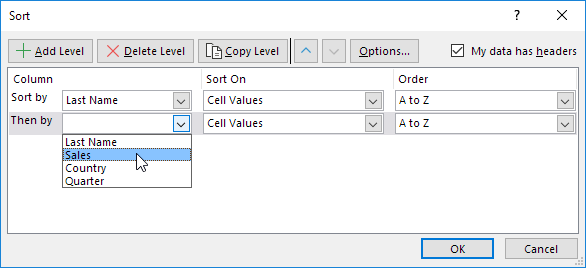
5. Click OK.
Result: records are sorted by Last Name first and Sales second.
Written by
Jason Howie
Founder, FormulasHQ
A formula nerd with a passion for numbers and equations. Writes about Excel, Google Sheets, VBA, regex, and Salesforce formulas — for people who spend their day in spreadsheets.