Possible Football Matches in Excel VBA
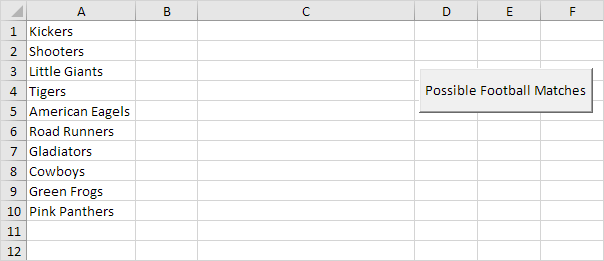
Below we will look at a program in Excel VBA that shows a print preview of all the possible football matches from a list of teams.
Situation:
1. First we declare one Range object and four variables. We call the Range object rng. One String variable we call matchname and three Integer variables we call counter i and j.
Dim rng As Range matchname As String counter As Integer i As Integer j As Integer2. We initialize rng with the team names. We use CurrentRegion because we don't know the exact boundaries of the range in advance (we want this program to work for 3 teams but also for 12 teams). We initialize counter with value 0.
Set rng = Range("A1").CurrentRegioncounter = 0
3. We write all the possible football matches to column C. First we empty column C.
Worksheets(1).Columns(3) = ""4. We start a Double Loop.
For i = 1 To rng.CountFor j = i + 1 To rng.Count
5. We write a matchname to the variable matchname.
matchname = rng.Cells(i).Value & " vs " & rng.Cells(j).ValueFor example for i = 1 and j = 2 Excel VBA writes the matchname Kickers vs Shooters. For i = 1 and j = 3 Excel VBA writes the matchname Kickers vs Little Giants etc.
6. We write the matchname to column C.
Cells(counter + 1 3).Value = matchname7. The counter keeps track of the number of matchnames written to column C. Excel VBA increments counter by 1 each time it writes a matchname to column C. To achieve this add the following code line:
counter = counter + 18. Don't forget to close the two loops.
Next jNext i
9. We show a print preview of all the possible football matches.
ActiveSheet.Columns(3).PrintPreview10. Test the program.
Part of the result:
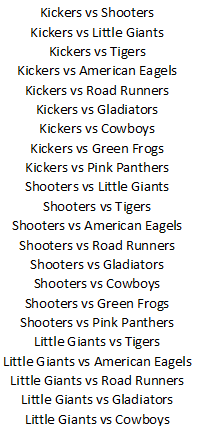
Note: column C is manually centered to get this result.
Written by
Jason Howie
Founder, FormulasHQ
A formula nerd with a passion for numbers and equations. Writes about Excel, Google Sheets, VBA, regex, and Salesforce formulas — for people who spend their day in spreadsheets.