MsgBox in Excel VBA (Easy Message Boxes)
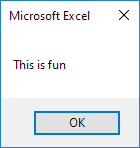
The MsgBox is a dialog box in Excel VBA you can use to inform the users of your program. Place a command button on your worksheet and add the following code lines:
1. A simple message.
MsgBox "This is fun"Result when you click the command button on the sheet:
2. A little more advanced message. First enter a number into cell A1.
MsgBox "Entered value is " & Range("A1").ValueResult when you click the command button on the sheet:
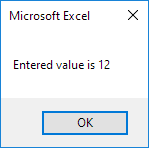
Note: use the & operator to concatenate (join) two strings. Although Range("A1").value is not a string it works here.
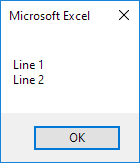
3. To start a new line in a message use vbNewLine.
MsgBox "Line 1" & vbNewLine & "Line 2"Result when you click the command button on the sheet:
Written by
Jason Howie
Founder, FormulasHQ
A formula nerd with a passion for numbers and equations. Writes about Excel, Google Sheets, VBA, regex, and Salesforce formulas — for people who spend their day in spreadsheets.