Life of Variables in Excel VBA

Sometimes you want to retain the value of a variable in Excel VBA when a procedure ends. You can achieve this by using the Static keyword.
1. Place a command button on your worksheet and add the following code lines:
2. Result when you click the command button on the sheet:

3. Result when you click another time:

Explanation: Excel VBA destroys the variable when the procedure ends. Each time you click the command button on the sheet Excel VBA creates the variable x again adds the value 1 to it and displays the result.
4. Now replace the keyword Dim with the keyword Static.

5. Result when you click the command button on the sheet:

6. Result when you click another time:
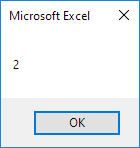
Conclusion: static variables retain their values even when a procedure ends.
Note: static variables will be destroyed when you click the Reset (Stop) button or when you close your workbook.
Written by
Jason Howie
Founder, FormulasHQ
A formula nerd with a passion for numbers and equations. Writes about Excel, Google Sheets, VBA, regex, and Salesforce formulas — for people who spend their day in spreadsheets.