How to use ExcelOctober 9, 2024
How to Add the Developer Tab in Excel
Turn on the Developer tab in Excel if you want to create a macro, export and import XML files, or insert controls.
To add the Developer tab to the ribbon, execute the following steps:
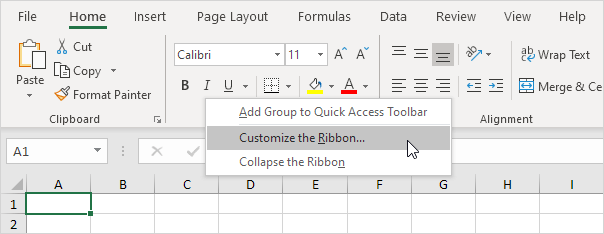
1. Right-click anywhere on the ribbon and then click Customize the Ribbon.
2. Under Customize the Ribbon on the right side of the dialog box, select Main Tabs (if necessary).
3. Check the Developer checkbox.
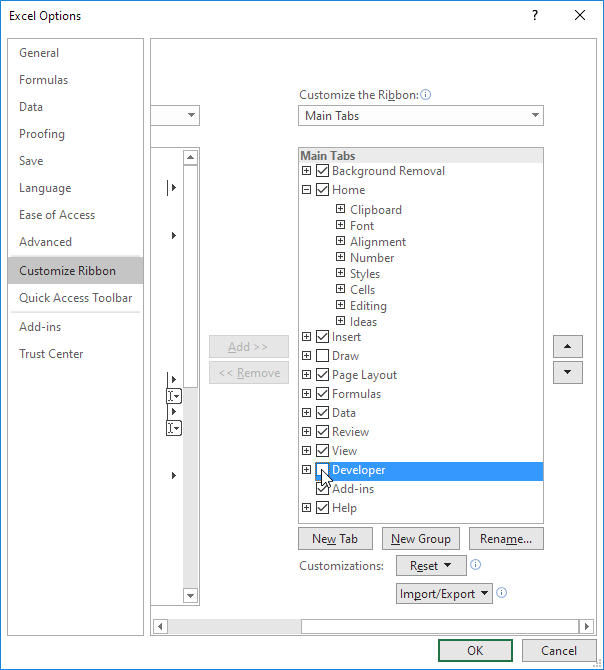
4. Click OK.
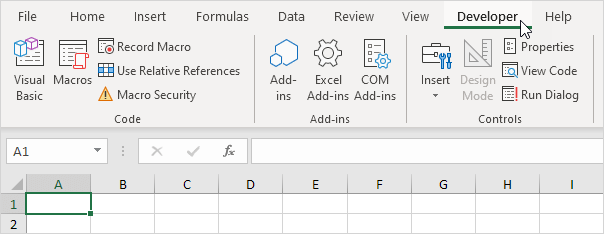
5. You can find the Developer tab next to the View tab.
Written by
Jason Howie
Founder, FormulasHQ
A formula nerd with a passion for numbers and equations. Writes about Excel, Google Sheets, VBA, regex, and Salesforce formulas — for people who spend their day in spreadsheets.