CurrentRegion Property in Excel VBA
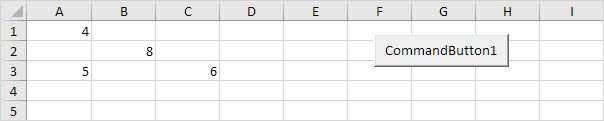
This example illustrates the CurrentRegion property in Excel VBA. The current region is a range bounded by any combination of blank rows and blank columns. Can you find the current region of cell A1?
Place a command button on your worksheet and add the following code line:
Range("A1").CurrentRegion.SelectResult when you click the command button on the sheet:

Here is another example. Can you find the current region of cell B3?
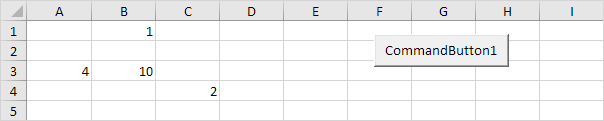
Code:
Range("B3").CurrentRegion.SelectResult:
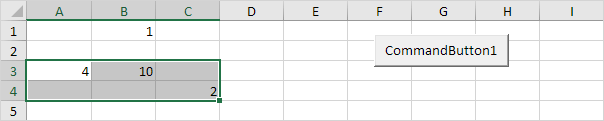
The value 1 in row 1 has no influence on the current region of cell B3. Row 2 is empty!
Written by
Jason Howie
Founder, FormulasHQ
A formula nerd with a passion for numbers and equations. Writes about Excel, Google Sheets, VBA, regex, and Salesforce formulas — for people who spend their day in spreadsheets.