Analysis ToolPak in Excel
The Analysis ToolPak is an Excel add-in program that provides data analysis tools for financial statistical and engineering data analysis.
To load the Analysis ToolPak add-in execute the following steps.
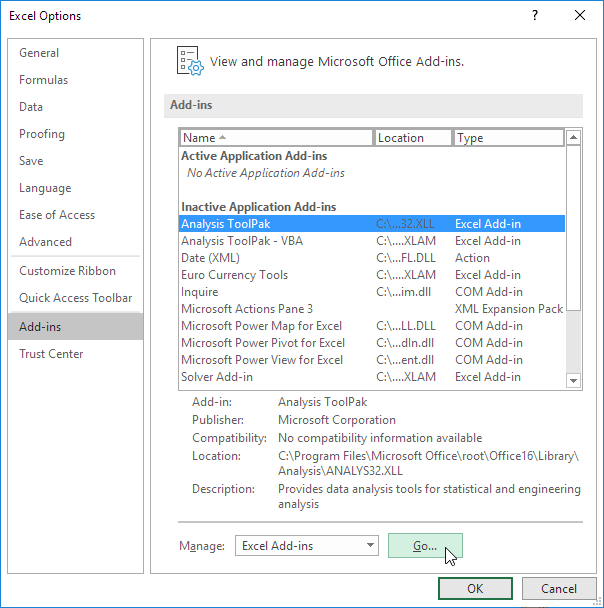
1. On the File tab click Options.
2. Under Add-ins select Analysis ToolPak and click on the Go button.
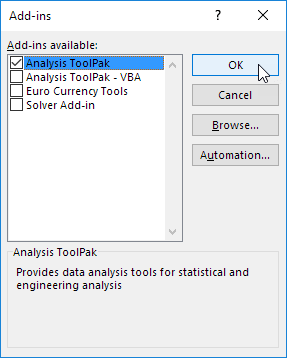
3. Check Analysis ToolPak and click on OK.
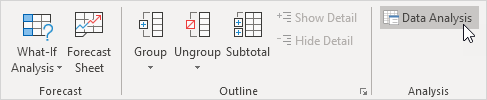
4. On the Data tab in the Analysis group you can now click on Data Analysis.
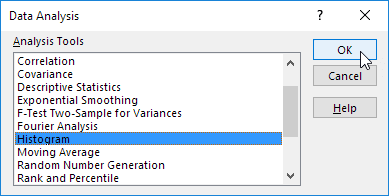
The following dialog box below appears.
5. For example select Histogram and click OK to create a Histogram in Excel.
Written by
Jason Howie
Founder, FormulasHQ
A formula nerd with a passion for numbers and equations. Writes about Excel, Google Sheets, VBA, regex, and Salesforce formulas — for people who spend their day in spreadsheets.