Randomly Sort Data in Excel VBA
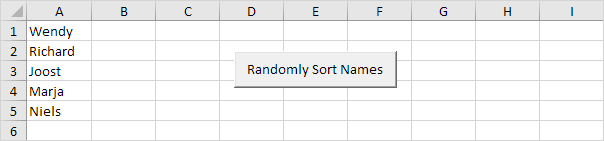
Below we will look at a program in Excel VBA that randomly sorts data (in this example randomly sorts names).
Situation:
1. First we declare four variables. One variable of type String we call TempString one variable of type Integer we call TempInteger one variable of type Integer we call i and one variable of type Integer we call j.
Dim tempString As String tempInteger As Integer i As Integer j As Integer2. We write 5 random numbers to column B (one for each name). We use the worksheet function RandBetween for this.
For i = 1 To 5Cells(i 2).Value = WorksheetFunction.RandBetween(0 1000)
Next i
Result so far:
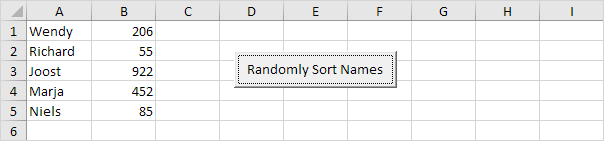
We will use the numbers next to each name to sort the names. The name with the lowest number first the name with the second lowest number second etc.
3. We start a Double Loop.
For i = 1 To 5For j = i + 1 To 5
4. Add the following code line:
If Cells(j 2).Value < Cells(i 2).Value ThenExample: for i = 1 and j = 2 Wendy and Richard are compared. Because Richard has a lower number we swap Wendy and Richard. Richard is at the first position now. For i = 1 and j = 3 Richard and Joost are compared. Joost has a higher number so nothing happens. This way Excel VBA gets the name with the lowest number at the first position. For i = 2 Excel VBA gets the name with the second lowest number at the second position etc.
5. If true we swap the names.
tempString = Cells(i 1).ValueCells(i 1).Value = Cells(j 1).Value
Cells(j 1).Value = tempString
6. And we swap the numbers.
tempInteger = Cells(i 2).ValueCells(i 2).Value = Cells(j 2).Value
Cells(j 2).Value = tempInteger
7. Don't forget to close the If statement.
End If8. Don't forget to close the two loops.
Next jNext i
9. Test the program.
Result:
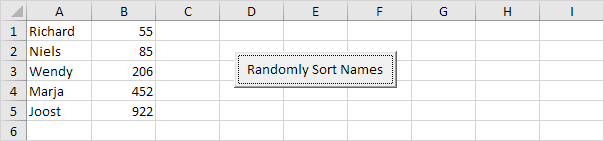
Note: you can add a line which deletes the numbers in column B. It's even nicer to place the numbers of each name in an array so no numbers are placed on your worksheet. However for illustrative purpose we've chosen to place the values on the sheet.
Written by
Jason Howie
Founder, FormulasHQ
A formula nerd with a passion for numbers and equations. Writes about Excel, Google Sheets, VBA, regex, and Salesforce formulas — for people who spend their day in spreadsheets.