Path and FullName Property in Excel VBA

The Path property in Excel VBA returns the complete saved path to the workbook (Excel file). The FullName property in Excel VBA returns the complete saved path including the name of the workbook.
Download path-fullname.xlsm and add it to "C:test"
Place a command button on your worksheet and add the following code lines:
1. The following code line returns the complete path to path-fullname.xlsm.
MsgBox Workbooks("path-fullname.xlsm").PathResult:
2. The following code line returns the complete path including the name of the active workbook.
MsgBox ActiveWorkbook.FullNameResult:
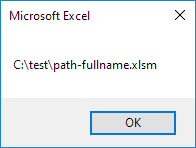
For a practical example of the FullName property see our example program Create a Footer Before Printing.
Written by
Jason Howie
Founder, FormulasHQ
A formula nerd with a passion for numbers and equations. Writes about Excel, Google Sheets, VBA, regex, and Salesforce formulas — for people who spend their day in spreadsheets.