Manage Conditional Formatting Rules in Excel
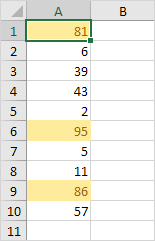
To view all conditional formatting rules in a workbook use the Conditional Formatting Rules Manager. You can also use this screen to create edit and delete rules.
1. Select cell A1.
2. On the Home tab in the Styles group click Conditional Formatting.

3. Click Manage Rules.
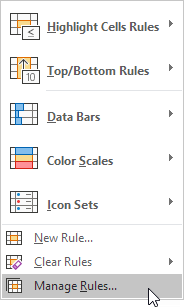
The Conditional Formatting Rules Manager appears.

Note: because we selected cell A1 Excel shows the rule applied to the range A1:A10.
4. From the drop-down list change Current Selection to This Worksheet to view all conditional formatting rules in this worksheet.
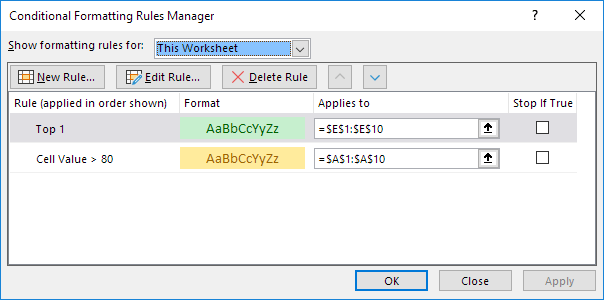
Note: click New Rule Edit Rule and Delete Rule to create edit and delete rules.
Written by
Jason Howie
Founder, FormulasHQ
A formula nerd with a passion for numbers and equations. Writes about Excel, Google Sheets, VBA, regex, and Salesforce formulas — for people who spend their day in spreadsheets.