Investment or Annuity in Excel
This example teaches you how to calculate the future value of an investment or the present value of an annuity.
Tip: when working with financial functions in Excel always ask yourself the question am I making a payment (negative) or am I receiving money (positive)?
Investment
Assume that at the end of every year you deposit $100 into a savings account. At an annual interest rate of 8% how much will your investment be worth after 10 years?
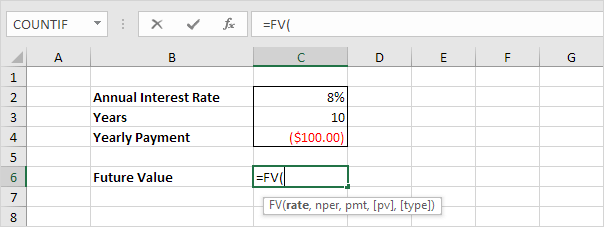
1. Insert the FV (Future Value) function.
2. Enter the arguments.
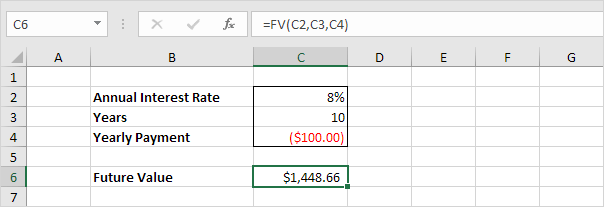
In 10 years time you pay 10 * $100 (negative) = $1000 and you'll receive $1448.66 (positive) after 10 years. The higher the interest the faster your money grows.
Note: the last two arguments are optional. If omitted Pv = 0 (no present value). If Type is omitted it is assumed that payments are due at the end of the period.
AnnuityAssume you want to purchase an annuity that will pay $600 a month for the next 20 years. At an annual interest rate of 6% how much does the annuity cost?
1. Insert the PV (Present Value) function.
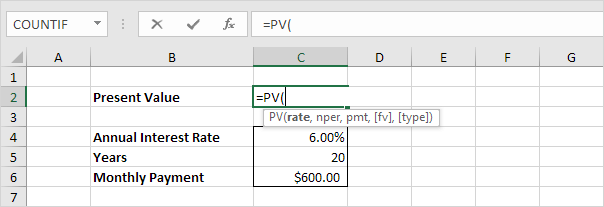
2. Enter the arguments.

You need a one-time payment of $83748.46 (negative) to pay this annuity. You'll receive 240 * $600 (positive) = $144000 in the future. This is another example that money grows over time.
Note: we receive monthly payments so we use 6%/12 = 0.5% for Rate and 20*12 = 240 for Nper. The last two arguments are optional. If omitted Fv = 0 (no future value). If Type is omitted it is assumed that payments are due at the end of the period. This annuity does not take into account life expectancy inflation etc.
Written by
Jason Howie
Founder, FormulasHQ
A formula nerd with a passion for numbers and equations. Writes about Excel, Google Sheets, VBA, regex, and Salesforce formulas — for people who spend their day in spreadsheets.