Array in Excel VBA
An array is a group of variables. In Excel VBA you can refer to a specific variable (element) of an array by using the array name and the index number.
One-dimensional Array
To create a one-dimensional array execute the following steps.
Place a command button on your worksheet and add the following code lines:
Dim Films(1 To 5) As StringFilms(1) = "Lord of the Rings"
Films(2) = "Speed"
Films(3) = "Star Wars"
Films(4) = "The Godfather"
Films(5) = "Pulp Fiction"
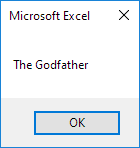
MsgBox Films(4)
Result when you click the command button on the sheet:
Explanation: the first code line declares a String array with name Films. The array consists of five elements. Next we initialize each element of the array. Finally we display the fourth element using a MsgBox.
Two-dimensional ArrayTo create a two-dimensional array execute the following steps. This time we are going to read the names from the sheet.

Place a command button on your worksheet and add the following code lines:
Dim Films(1 To 5 1 To 2) As StringDim i As Integer j As Integer
For i = 1 To 5
For j = 1 To 2
Films(i j) = Cells(i j).Value
Next j
Next i
MsgBox Films(4 2)
Result when you click the command button on the sheet:
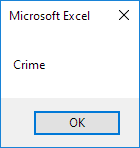
Explanation: the first code line declares a String array with name Films. The array has two dimensions. It consists of 5 rows and 2 columns. Tip: rows go first then columns. The other two variables of type Integer are used for the Double Loop to initialize each element of the array. Finally we display the element at the intersection of row 4 and column 2.
Written by
Jason Howie
Founder, FormulasHQ
A formula nerd with a passion for numbers and equations. Writes about Excel, Google Sheets, VBA, regex, and Salesforce formulas — for people who spend their day in spreadsheets.